Based on the same framework as my ABC Tin Whistle Fingering Player, I’ve just released a new ABC Recorder Fingering Player.
The new tool also leverages the Baroque and German recorder fingering images already built into ABC Transcription Tools, along with its Soprano and Alto recorder instrument samples for playback.
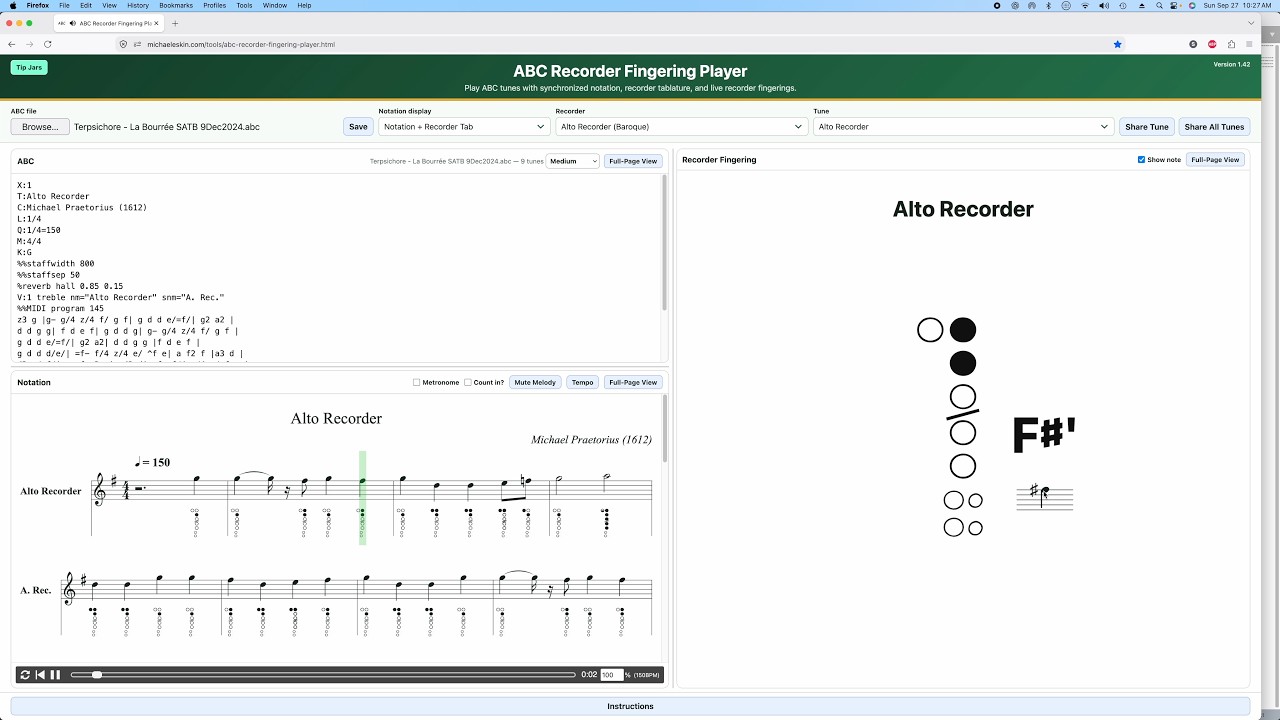
Load, type, or paste an ABC tune and the tool displays standard notation along with optional recorder fingering tablature.
You can choose from four recorder configurations:
- Soprano Recorder — Baroque fingering
- Alto Recorder — Baroque fingering
- Soprano Recorder — German fingering
- Alto Recorder — German fingering
As the tune plays, the notation cursor follows the music while a large live recorder diagram shows the fingering for the current note. You can also display the note name and its position on a musical staff alongside the fingering.
The tool includes synchronized recorder audio playback, adjustable tempo, metronome and count-in options, and the ability to mute the melody for practice. Chord and bass accompaniment remain available for tunes containing chord symbols.
You can switch between standard notation alone and notation with recorder fingering tablature, and use full-page views for the ABC, notation, or recorder fingering display.
Multi-tune ABC files are supported, with a Tune menu for moving between tunes. You can edit the ABC directly, save your changes, and create share links for either an individual tune or an entire collection.
Demo video:
You’ll find the new ABC Recorder Fingering Player here: