I just received my video “The Heart of the Instrument” and neither disk will play. I noticed a couple of other complaints about this on the list. Is this a widespred thing? Any suggestions?
All the best,
Pat Sky
I just received my video “The Heart of the Instrument” and neither disk will play. I noticed a couple of other complaints about this on the list. Is this a widespred thing? Any suggestions?
All the best,
Pat Sky
Yes, there seems to be a lot of this. I suggest letting NPU know, and from what I understand, they will replace your DVDs… hopefully with working ones.
Quality control doesn’t seem to have been a criteria when producing these DVDs.
i also learned when trying to set up my computer for playing dvds that dvds and dvd players have a sort of “regional encoding” from 1 to 5…if it doesn’t match, it won’t play - not a quality control thing.
you might want to try playing it in your computer…
The NPU discs are coded as Region=0, which means they will play in any region. What I ran into was that I had an outdated decoder software that needed updating on my PC.
I also had one bad disk. NPU replaced the whole set, and gave me a credit for return shipping. Note that the CD-R coding on these discs is the very latest, so older, stand-alone DVD players may not be able to read them (mine can’t).
djm
My DVD player is brand new. I haven’t tried it on a computer. I want it to play on my TV. How do you tell what the zone settings on the disk are?
I get a message " this disk is un-playable"
Pat Sky
If there would be a missmatch of the regional code on your DVD and your DVD-player then this should be cleary said in the message. Some DVD players allow changing their regional code legally … but if this it not the case, there’s lot of (not so very legal) tricks to tweak the regional code of the DVD player.
From your message instead I would either think that the DVD is broken or that your DVD player might need a firmware update (i.e. somehow he doesn’t get the first track, software / hardware things involved). I had similar problems with my DVD player at home and the update did the trick. Please check the webpages of the manufacturer for firmware updates and how to do it with your model.
Pat,
When I phoned NPU with my disc 2 problem (it looked unburned/blank to me and wouldn’t report a disc in the drive) they said they had had problems generally, so I would recommend returning it, they were very prompt with mine. No problems at all with the replacement.
Talk about suspense! The wait is worth it though.
Alan
The firmware update option is correct for DVD drives on PCs, but I don’t know of any way to update the firmware on a stand-alone DVD player, unless there is a TV repair shop near you that might know how to do this.
There is a lot of trouble with stand-alone players being up-to-date enough to read all data formats on CD-R discs - one of the recognized and outstanding issues to be resolved for this method of burning DVDs. The industry is still too young to have settled on many standards, and new coding methods are popping up all the time.
djm
Another problem is that the DVD may be encoded for PAL (European TV standard) rather than NTSC (US standard). Many computer DVD drives seem to be able to handle either format, but stand-alone DVD players generally won’t.
-No E
The update of the firmware for my Philips (stand alone DVD player) was really easy. I needed to download a binary file from their webpages, burn it to a CD-RW, insert the CD into the machine and follow easy instructions. So if you can handle an uilleann pipe … that this is an easy task! 
That might be an issue of more importance. The standard of DVD-R or DVD+R is not decided yet but I thought that most manufacturers (of players … not burners) might have both options. So Pat might want to check the DVD format description of his player. My guess is that the NPU reedmaking DVD is DVD+ standard?!?
Thies, no, actually the NPU set is DVD-R. I was not aware that the firmware updates were available this way for stand-alone DVD players. Thanks for that. I will check it out.
Larry, the NPU videos come in both a PAL and an NTSC format set. NPU knows where to send each format. I am not aware of this being an issue. Its a good point to watch out for, though, for people ordering videos from other countries.
djm
Just talked to our IT engineer and he said that the region code, actually on the disk, must match the region of the player . If they are mismatched then you can get a “region ripper” from the internet that will allow you to copy a new DVD and change the region settings.
Thanks all,
Pat Sky
Found this on the internet concerning regions:
http://www.laserrot.com/info/lrinfo/dvdmap.html
All the best
Pat
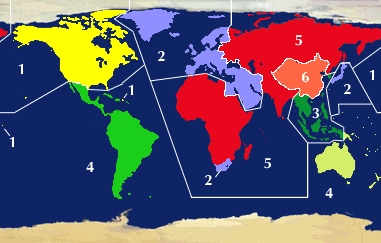
… but what about Antarctica? No chance to see DVDs down there? 