Running Windows 10 on a new HP Envy laptop, here. The issue: Used to be when right-clicking on an image, one got a “Save as wallpaper” (or other such wording to that effect) option on the list. I don’t see that option any more. Anyone know what’s up with that? Seems that the only wallpapers I can use now are limited to those preordained by Microsoft, and true personalization is out the window. If there’s a way to get around that, I would love to know.
Type ‘wallpaper’ in the search box and it takes you to Settings > Background, which includes Browse as an option.
Terribly sorry, but could you explain that more clearly? Earlier on I did try typing “wallpaper” in the Google search box, but the first thing I got was home decor. I have a feeling you’re talking about a different procedure.
Windows 10 search box, visible bottom left on my computer. If you’re not seeing that, click the start icon, then the gear wheel icon (settings), which will give you a settings search box.
Ah, I see! You know, I’ve never used that before, so it was sort of an out-of-sight-out-of-mind thing. Thanks.
Tried it, but I’m still not getting what I’m looking for, which is to say the ability to pick any picture on the Web and use it for my background, rather than what’s designated on offer. Those pics are nice - really nice - but let’s say I came across a pic of a flange and wanted to use that (I probably wouldn’t, but this is just to clear away any ambiguity): I’m trying to figure out how to do it. As I said, I used to have the option to use any random pic at all as a wallpaper, but if that option is still available in this new format, I can’t find it.
If I right-click a saved picture, whether viewed as icon, details or whatever, I get ‘Set as desktop background’. But the method I already suggested to you also allows you to choose a saved picture by browsing to it, so just save it first?
Yeah, I no longer have that option for some reason. Weird.
I see you edited the above to “saved picture”. We’ll see if that makes any difference, but I have my doubts. Anyway, I’m going to have to save some pics, then. This laptop’s so new that I haven’t saved any pictures on it yet (I typically don’t keep what I’ve saved when switching computers).
Looks like that’s the way to go, then. I’ll try it and see how it goes, but don’t be surprised if my lame self comes up with more questions! Might not be today, but we’ll see.
Thanks. 
It worked! Thanks a bunch, Peter.
Here it is:
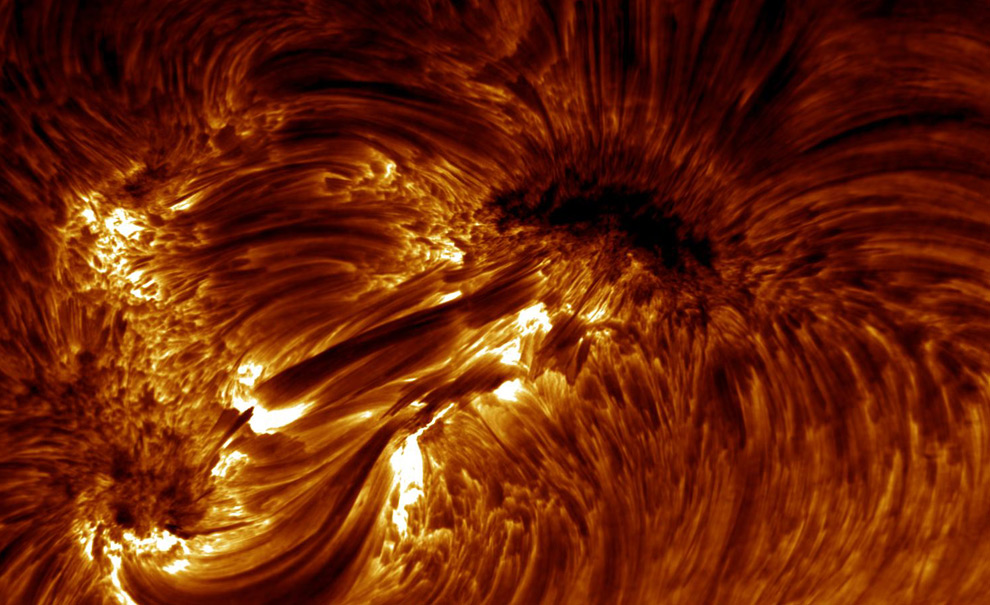
I have a thing for the dramatic patterns you get from the solar surface.
Can also still do this to a picture straight from a website (not that I’d want to)… just hadn’t checked because you said you couldn’t. So maybe there was something else (not Windows 10) preventing you doing so for your chosen picture(s)?
Right-clicking on an image in a web browser window is a browser function, not Windows 10. Firefox still has “Set as Desktop Background”, and I.E. still has “Set as background”. MS Edge, the default browser on Windows 10, does not, although it does have “Save picture as”. Which browser are you using? Windows 10 file explorer still has “Set as desktop background” when you right click on an image file on your hard drive.
Chrome. Been using it for quite a while.
OK, not a direct option for me in Chrome on Windows 10 either (just tested).
I was wondering if this is a new development, or if I just hadn’t noticed for some reason.
Pardon me for going all geek on you, but this is likely a picture taken in the extreme ultraviolet (EUV). The surface of the sun is a few thousand Kelvin, while the corona, which is very sparse, so doesn’t emit nearly as much heat, is in the few hundred thousand K to a few million K. The EUV radiation doesn’t have any penetrating power (it’s 99% absorbed something like 100 miles from the Earth’s surface), so the telescopes that take these pretty pictures are for the most part in an orbit around a Lagrange point (stable gravity equilibrium between the earth and the sun). The only way to get a high-resolution image in the EUV is with a multilayer mirror, which has a coating that reflects a narrow wavelength range. The telescopes usually have many sectors, each with a different coating, so that they can take quasi-realtime images at different wavelengths. The wavelengths represent different temperatures in the corona, and the images are fed into models to get a better understanding of how the sun operates.
These data are also important for climate modeling. The EUV is only about 0.01% of the solar output, but it’s about 10% of the solar variability during a solar cycle. Plus, while none of it reaches the surface of the earth, it has a lot of impact on upper atmosphere dynamics, especially the ionosphere.
(I’m not a solar physicist, I only study the multilayer coatings, and I LOVE these pictures. In fact, I have one as my desktop on my Mac.)
What’s ZZ-Top got to do with it !?
“sectors” ? Like, pie-shaped ? How are the different wavelengths de-scrambled ?
Inquiring minds want to know !
trill
No comment on ZZ Top (not my cuppa).
But in terms of the sectors, the slice of pie is the correct description. Typically the shorter wavelengths will have bigger sectors because the sun’s output goes down at shorter wavelengths. On one telescope I remember, the three shortest wavelengths were quadrants, then there were maybe four or five in the last quadrant.
The wavelengths are determined by the coatings. You can think of the multilayer coatings as either a large-spacing synthetic crystal or a very compressed laser (dielectric) mirror. The period (spacing, layer thickness) of the coating is half an optical wavelength, so a shorter-spaced multilayer reflects a shorter wavelength. There’s an aperture in front of the entrance of the telescope that selects which sector is illuminated, so this is how they select the wavelength.
Is that a rugate filter ?
My understanding is that a Rugate filter is a notch filter – it rejects a narrow band.
These coatings reflect a narrow band. They’re like a laser mirror (half-wave plate) but are made from absorbing materials, so the reflectivity peaks at around 70% with a band of about 4%.