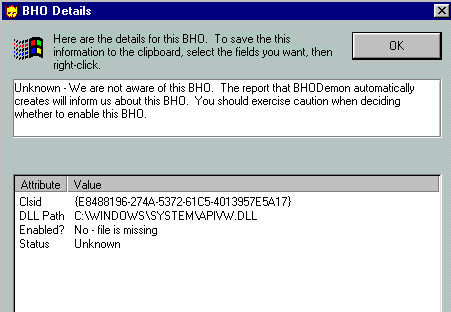
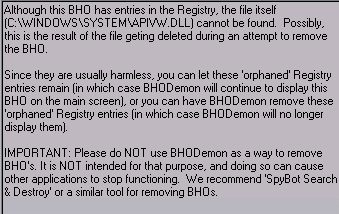
Here are the BHODemon screens:

The bottom two items on this list are associated with Spyware Doctor.
Now what?
Best wishes,
Jerry
Here are the BHODemon screens:
The bottom two items on this list are associated with Spyware Doctor.
Now what?
Best wishes,
Jerry
I dont see anything that jumps out as causing problems.
IF IT WERE MY COMPUTER (ie, proceed at own risk!), I would do an online virus scan,
http://housecall.trendmicro.com/housecall/start_corp.asp
delete all of the objects, clear the cache, select an extremely benign home page (no bells and whistles) as my start page. and then repair the IE install.
I would then repeat it to make sure that nothing popped up…
Hi Jerry!
Sounds like you been infected by a trojan. They have a nasty habit
of copying themselves into other files and system restore.
Ad aware can often delate the spy running but it will not eliminate the source if its being
run by a trojan, that’swhy they keep coming back.
Best free anti virus/trojan software is AntiVir
(I just removed 4 trojans from a friends computer that Norton didn’t find). Just download it,
install it and it will start scan your system (very simple to use). Delete any detected
virus or trojan. And dont do a system restore after you removed found virus/trojans.
If the problem still keeps coming back its either non virus related or a real bad version
that copied itself into win-system files and therefore cant be removed without screwing
up your computer. In both cases you better back up your files on another drive, reformat
your C: drive and make a new clean installation. Just remember to scan your backed up
data before you move it back.
You are welcome to send me a mail if you need any assistance.
/MarcusR
I couldn’t get AntiVir to open after downloading it. It got stuck in the unzip process.
I ran the “housecall” virus scan and found 0 infections. (I also ran Norton AntiVirus right after I started having trouble and found no viruses. However, it did find some adware that NortonAV says it can’t delete.)
I deleted all the objects, as per Smoot’s recommendation.
I deleted (again, for the second time in as many days) all cookies and temporary Internet files.
I re-re-re-re-repaired Internet Explorer, and as usual, it’s running fine right now without the runtime error messages. It takes a few hours of activity before they show up again after repairing IE, so we’ll have to see if anything’s changed.
I’ve sent emails to the Spyware Doctor people, but I’m not optimistic about hearing from them soon. Their website says to expect delays in response to questions.
I’ve backed up everything critical and gathered all my software and recovery disks in case I need to clear the hard drive and start over. But I don’t want to do that! sigh
Best wishes,
Jerry
Less than an hour later, and the runtime errors are back.
Best wishes,
Jerry
Hi Jerry!
Still think it’s a trojan. The ones I removed this weekend opened up about 20 popup windows and
generated over 70 tasks identified by Adaware. Norton did not find any of these four trojans
and even though adaware removed the spyware files they kept on coming back as long as
the trojan was alive. After running antivir and remove the detected trojans everything was fine.
What file did you download from AntiVir Jerry?
The only zip files I can find on their site are info-files.
The software file is called “avwinsfx.exe” and is a self executing installation file.
Just click on the AntiVir logo on the download page.
However not all virus/trojans can be removed without damaging the system. A month ago
I got a trojan called “TR/Drop.Delf.FD.1” in a file from a friend. It took control of my network
resources and tried to connect to an internet casino in the US. When I tried to remove it,
it copied itself into the system files alg.exe, svchost.exe and similar. I had no clue how to get rid
of it so format c: became the only solution 
/MarcusR
OK, I think we’ve got it …
Marcus, I tried again to download AntiVir, and this time it unzipped successfully. It found and deleted two Trojans. Then I had to go back and reset Norton AntiVirus to launch on startup and turn off AntiVir from launching on startup, as I want to keep NAV as my continuously running antivirus application. I’ll run AntiVir every week or so.
I did a Google search on About:Blank and found this thread:
http://www.dbforums.com/t705228.html
(Earlier, Spyware Doctor had identified About:Blank as a spyware infection on my computer, but couldn’t remove it, thanksalotfortwentyfivedollars.)
A page or two into the thread I found
I had the same problem. Tried every recommendation from every forum, site, etc. including Symantec. Couldn’t figure it out. Downloaded a trial version of SpySweeper and within about fifteen minutes it was detected and gone. I just rebooted my machine and the start page is still what I want it to be. There is no sign of the .dll file anywhere. So…if it comes back, I’ll post again.
I don’t feel safe monkeying around with registry files, as most of the people posting to that thread were suggesting, so I was pleased to find an antispyware program that would do it automatically.
I downloaded SpySweeper and scanned the system, identifying About:Blank again, but it wouldn’t remove anything without my buying the software for $29.95, which I did. Then, reading the material that came with the purchase confirmation, it said it couldn’t remove About:Blank but they’re working on it. Reading further into the thread, I found that some people had tried SpySweeper and it didn’t work on About:Blank. So I was bummed.
But I tried it anyway, and guess what? It worked fine. Piece of cake. Then I ran Spyware Doctor again, and sure enough, About:Blank was gone.
Oh, and I downloaded all the Windows 98 security updates.
Still keeping fingers crossed
I’ll say again, I really appreciate all your help. In addition to solving some current problems, I’m learning how to do a lot of things I had wanted to know about.
Best wishes,
Jerry
That sounds good, Jerry! You’ve inspired me to run some anti-spy stuff on my work and home computers.
Now…how’s your firewall?
When we had to move all our computers from work to home while our new office was being prepared (it only took a month), one of the first things I did, after getting DSL for home, was to get a router to use as a hardware firewall. (It’s a Linksys EtherFast Cable/DSL Router with 4-port switch, if you’re interested. Our IT guys at work recommended it.)
I had a software firewall for the old home computer, but it wasn’t letting me VPN into the work servers, so I had to let it go.
I expect to be able to use those two purchases (DSL and the router) to be able to work at home more often this winter–especially when it snows.
M
I don’t know anything about firewalls.
I’m on Road Runner with the accompanying router.
Do tell.
Best wishes,
Jerry
sigh
It’s baaaaack …
Best wishes,
Jerry
Hi Jerry!
I’m sorry it didn’t work out for you.
Run AntiVir again and if the trojans are back then you know that they
have copied themselfs into some other files.
Also update AntiVir, the installation file is a few weeks old.
about:blank seem to be a homepage hijacker, I dont know if its generated by any of the trojans
you detected (do you remember the names?) or if it just that it wasn’t removed completly from your system.
Have you seen this thread?
Adware away (hard to believe that they are the only ones. If so, why? …)
Never heard of the company but they seem to have a solution. You can get a trailversion from their download page.
or
about:blank
They got manual step-by-step instructions if you want to edit the registry.
You have spent quite some time on this by now, and in the end a reformat might be the quickest and most efficient solution.
I know its a drag but …
Good luck!
/MarcusR
Hello, again.
I’ve downloaded the update for AntiVir and run it again. No more Trojans.
I’m fairly certain about:blank is gone. I was getting a lot of popups before, and that isn’t happening now. Generally, everything’s running faster, cleaner. Except once in awhile, I get that runtime error message.
I really don’t want to restore the hard drive unless I absolutely have to. I’ve got an LCD monitor that needs its own driver loaded, so to start setting everything up again, I’ll have to drag the old CTR monitor up from the basement. And then there’s all the software to reload (much of which was downloaded, so there’s no copy on CD) and files to recopy. Big, annoying project.
What’s the downside of just leaving it alone and not worrying about the runtime error messages?
Best wishes,
Jerry
Sometimes the spy/virus removers can’t remove the files because they are in use.
Sometimes I’ve had to actually kill processes, go into the registry and manually take things out. This is especially true in cases where the problem reoccurs after cleaning. What happens is the program i.e. spy.exe or spy.dll will register itself. In the registry you may find an entry for spy.dll or it may have another name but the values on the keys will be a Program Identification Number (PID). When the spy removers do their magic they fail to remove the PID from the registry. It appears that somehow, using that PID, the the offending entity can reinstall itself. Only by tracking and deleting that PID can it be fixed.
I wouldn’t try this unless you are very comfortable with playing in the registry. Therefore that was all useless information.
Something you CAN do though is:
Good news Jerry, now we know you’re clean at least.
The runtime error won’t cause any harm as long as it doesn’t crash windows or hangs applications.
The run time error 226 is related to a local storage overflow and/or a storage address no longer present. I don’t think the runtime error has anything to do with the spyware/trojans you found. It might be due to an incomplete or improper uninstall.
Have you uninstalled any software recently?
If so install it and uninstall it again after reboot.
The only other reason I can think of is if you installed some software/plugins etc that’s not fully compatible with win9x as its limited to 64 stacks (1024 in win2k). From what I can find others have had similar problems after they installed video/audio editors, DivX, virtual CD etc.
One thing that you could try is to uninstall the driver for your new LCD monitor and plug in the old one and see what happens.
You can also mail me the content in your config.sys file (C:\WINDOWS\config.sys) and I will check if I can find anything there.
You have now turned this into a sport, → we have to fix this without reformatting C: 
/MarcusR
I typed “runtime error 226” into Google and got a lot of ads for software that cleans up the registry and fixes errors.
I found this comparative review of 20 registry repair packages:
http://www.registry-repair-software-review.toptenreviews.com/?ttreng=1&ttrkey=pc+powerscan+review
I downloaded (free) and ran the top rated one, Advanced System Optimizer. It fixed a bunch of things, but didn’t solve the runtime error 226 problem.
Then I downloaded and paid ($51.00) for Fix-It Utilities, the second rated package. It took a lot longer (hours) to do all its stuff, but it may have solved the problem.
fingers still crossed
Best wishes,
Jerry
It’s baaaack …
Best wishes,
Jerry
Marcus,
I tried looking for C:\WINDOWS\config.sys , first by browsing through the files (found nothing by that name in the C/Windows/Config/ folder) and then by typing C:\WINDOWS\config.sys into the IE address bar. It gave me a list of programs and asked which one I wanted to use to open it.
Then an error message showed up, “Cannot find file C:\WINDOWS\config.sys , etc.”
What do I do next?
Best wishes,
Jerry
I ran both register repair programs again, and they cleared out a lot more stuff.
I especially like the way the Fix-It Utilities program works. “TopTenReviews” rated it number two, but safer than the one they rated number one.
I ran the registery fix scan, and it presented numerous defective registry items, labeled with green, yellow or red flags. The green ones were all preselected, but the yellow and red items required review and selection. The instructions said not to touch any yellow or red flagged items unless I was sure they’re unnecessary (so I left them all alone).
After removing all the green flagged items, it recommended running the scan again, because the registry items are heavily interlaced and more problems could be revealed after removing the first batch of defective ones. Sure, enough, it took three scans to get to a point where no more green flagged items showed up. I must have removed 150 or so defective items from the registry.
Best wishes,
Jerry
Sorry, some mental typo there, it’s in the root (C:\config.sys) if you have it.
Win98 don’t need the config.sys file but will use it if its there. In some cases with older computers (motherboards) there can be tasks that can’t be handled without config.sys such as built in BIOS routines, on board virus scans, memory managers and device drivers. If you dont have it I wouldn’t worry about it, but if its there mail me the content and I 'll have a look at it.
/MarcusR
Hi, Marcus.
I found the config.sys file, but I get a dialog box asking me what application I want to use to open it. (It occurs to me that maybe I’m just supposed to attach the file to an email. Is that what you meant?)
Maybe we don’t need to take this next step of looking at the config.sys file. After the first round of registery repairs, it took longer for the runtime error messages to start again, and they were much less frequent than before. Now that I’ve done a more thorough round of registery repair, I’m not getting runtime error messages at all right now. Shall we wait a few days and see if it’s really fixed?
We’ve removed two Trojans; several hundred items of spyware including About:Blank, which is particularly bothersome and difficult to remove; and corrected around 250 to 300 registery errors.
Other than the two Trojans, no viruses have been found by Norton AntiVirus, AntiVir or Fix-It Utilities. Of the three antivirus programs used, no other software except AntiVir was able to recognize the presence of the two Trojans. Three of four anti-spyware programs I used were unable to remove About:Blank. Spysweeper was the software that succeeded at that.
Spyware Doctor has refunded my $29.95. Spyware Doctor identified the About:Blank infection, but stated that it was unable to remove it and I should contact customer service for instructions how to remove it manually. It took six days for customer service to respond to my emails asking how to remove About:Blank. I told them the problem had already been solved by another software and I wanted a refund, which they processed in a matter of minutes. If they had responded to my original problem that fast, instead of taking six days, I never would have asked for a refund.
Again, thanks for all your help.
Best wishes,
Jerry