Introducing the ABC Ocarina Fingering Player
I’m pleased to announce the initial release of the ABC Ocarina Fingering Player, a free web-based tool for learning and playing tunes on 12-hole ocarinas using ABC notation.
The player displays synchronized standard music notation, optional ocarina fingering tablature beneath the notes, and a large live fingering diagram that updates during playback. You can also click individual notes or navigate forward and backward through a tune to study the fingerings at your own pace.
Supported Ocarina Models
The player supports ten 12-hole ocarina models across soprano, alto, and bass ranges:
- Soprano: C, D, F, G
- Alto: A, C, D, F, G
- Bass: C
The selected model determines the appropriate fingering patterns and playback register.
Octave Shift
The Octave Shift selector provides two options, 0 and -1, allowing you to use the original fingering octave or shift it one octave lower. The displayed music notation remains unchanged while the fingerings and playback adjust accordingly.
Additional Features
- Adjustable playback tempo, metronome, and count-in
- Load, edit, and save ABC tunes and tunebooks
- Large fingering display with optional note names and staff notation
- Previous/next note navigation, including optional keyboard arrow-key control
- Full-page notation and fingering views
- Shareable tune links and lesson creation for instructors
- Printing of standard notation with optional ocarina tablature
Demo video:
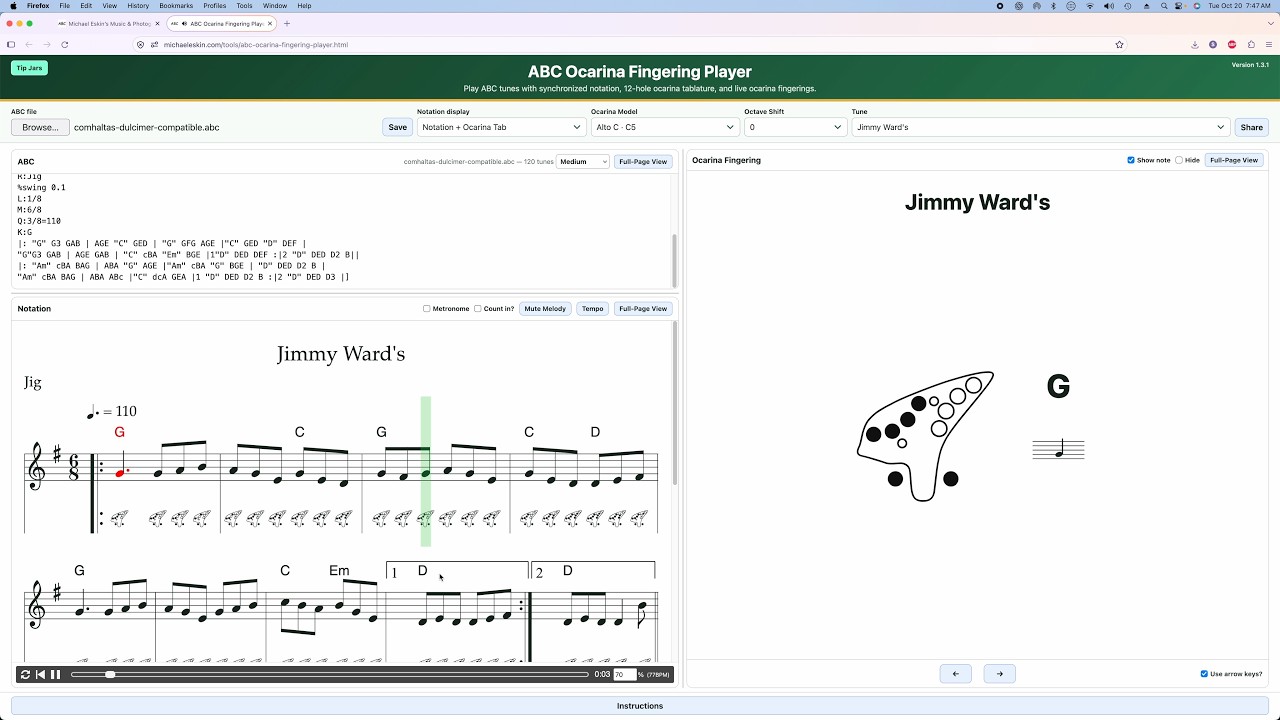
ABC Ocarina Fingering Player v1.3.9 – New Features
-
Solve Missing Notes: Automatically adjusts notes outside the selected ocarina’s playable range by shifting them up or down one or two octaves. A new button in the Notation pane provides visual confirmation when all notes are solved and alerts users if some notes remain unplayable.
-
Placeholder Fingering: The Ocarina pane now displays an all-open-hole fingering diagram whenever no note is selected during playback or manual note navigation.
These improvements make it easier to adapt ABC tunes for different ocarina models and octave settings.
Demo video:
Try it here: